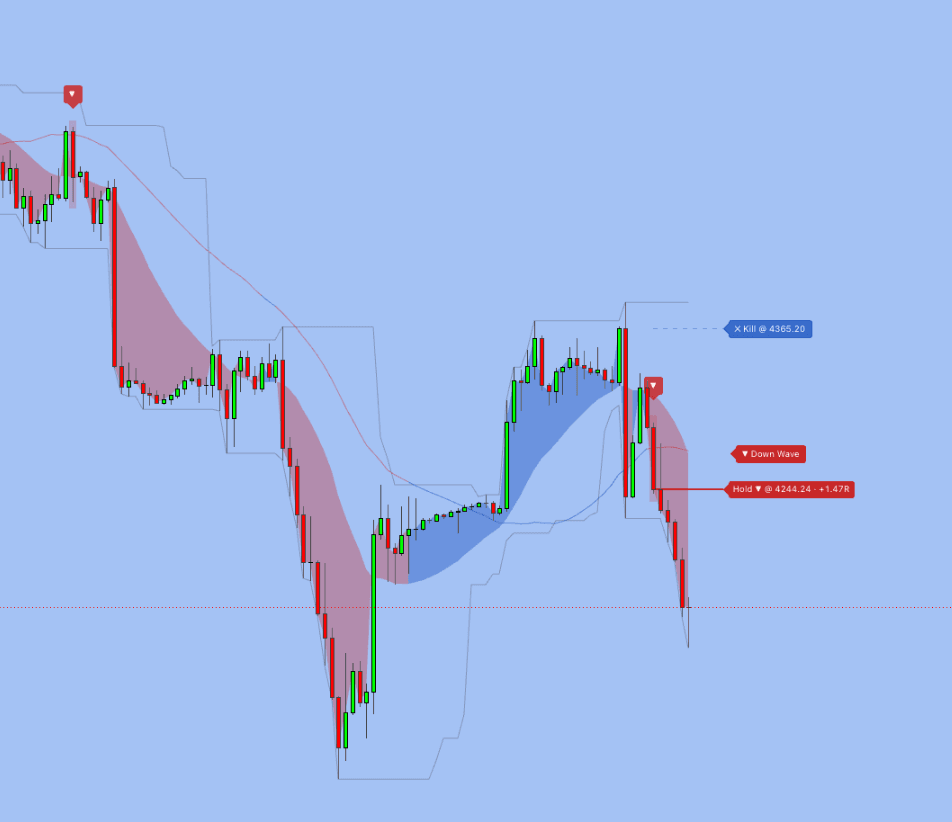
Trade Compass PRO is a single-stack chart overlay that gives a trader everything needed to read a setup at one glance: a smoothed trend wave, projected ATR-derived stop levels, crossover entry arrows, a Double Timeframe confluence gate, a Hold-to-Next-Opposite trade lifecycle, a switchable channel envelope, and a regime filter that hides arrows during flat markets.
This is not a basic crossover plot. Each component is gated by the next, so arrows never fire blind to context. The Auto Tuning mode adapts three timeframe-sensitive parameters to the chart you are on, and the Hold projection draws a live R-multiple counter beside the entry line so you see floating performance without opening any panel.
How Trade Compass PRO Works
Step 1: Auto Tuning
Add the indicator and Auto Tuning resolves Trigger Length, ATR Multiplier, and Entry Cooldown to the chart timeframe. The trend wave colors by slope direction, the channel envelope draws over the last N bars, and ATR stop levels appear as segments anchored to the recent cross. No manual adjustment needed — switch from 15M to 4H and the parameters adapt automatically.
Step 2: Entry Arrows
A blue BUY bubble fires when the source crosses above the Trigger SMA. A red SELL bubble fires on the opposite cross. Each arrow is gated by trend, wave alignment, regime, Double-TF confluence, volume, cooldown, and price-proximity filters. Only arrows that pass all active gates appear on the chart.
Step 3: Trade Lifecycle
With Hold mode ON (default), the entry price line projects forward from the firing bar with a right-edge label showing direction, entry price, and live R-multiple (1R = one ATR × Multiplier). A faint dashed kill line shows where the Hold auto-invalidates if price moves too far against you.
Key Components
Double-TF Confluence Gate
Requires the same-direction cross on an adjacent lower timeframe inside a tunable confluence window. A 1H chart checks the 15M, a 4H chart checks the 1H, and so on. This filters the false fires that single-TF crossovers cannot see. Disable for single-TF mode when trading on tick-sensitive setups.
Regime Filter + Sideways Suppression
The regime filter measures channel compression in ATR multiples. When the Channel-over-ATR ratio drops below the Sideways Threshold, the market is classified flat and crossover arrows are suppressed. This catches choppy ranges that trend filters alone miss — no more clusters of arrows in sideways markets.
Adverse-Excursion Kill Line
Most "hold to next opposite" implementations let projections survive massive adverse moves. Trade Compass PRO draws a visible boundary — the kill threshold — where the Hold auto-invalidates. If price closes beyond that line, the projection clears, protecting your analysis from stale setups.
Dashboard
A real-time panel shows Trend direction, Regime status (Trending/Sideways), Dual TF state, current ATR, both stop levels, Bars in Trade, and the resolved Auto parameters. Everything needed to read the current bar without opening Settings. The legend table shows marker meanings: Bull/Bear cross entries, Hold projection with live R-multiple, and kill threshold.
Backtesting
Trade Compass PRO includes built-in backtest capability. Over 3,000 trades tested across 15 crypto pairs including BTC, ETH, SOL, AVAX, and ADA on multiple timeframes over 5 years of data. Two trading modes validated: Hold mode (4h, positional trading) and ATR mode (30m, active scalping with 5+ trades per week).
The flagship configuration — ETH 4h with DualTF enabled — achieved a profit factor of 4.01 with 50% win rate and +167.1R total profit. SOL 1h DualTF produced +282R over 136 trades. In 30m ATR mode, AVAX delivered +131.9R over 1,356 trades (5-year validated) and SOL produced +100.6R over 1,372 trades — the largest sample sizes confirming statistical robustness. Monte Carlo validation (1,000 reshuffles) confirmed 100% profitable paths. Non-repainting by default — arrows fire on bar close. For more on validation methodology, see our backtesting guide.
Best Markets and Timeframes
- Crypto — Auto Tuning adapts seamlessly across volatile crypto pairs. ETH 4h DualTF leads with PF 4.01. SOL, BTC, AVAX, ADA all show profitable results across Hold and ATR modes
Recommended timeframes: 15M–30M for intraday with the Volume Gate enabled. 1H–4H for swing trading with full confluence gating. Daily for position entries with the highest-quality setups.
All EXCAVO PRO indicators are included in one subscription — no tiers, no upsells.